Replication dashboard do no open on store server
ProblemReported:
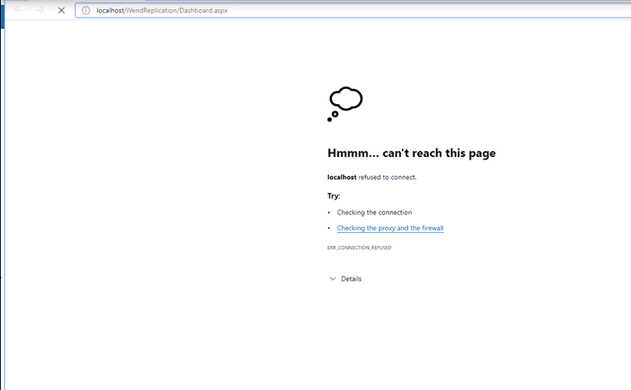
The replication dashboard does not open on the store server. Error "Can't reach this page" appears
Cause:
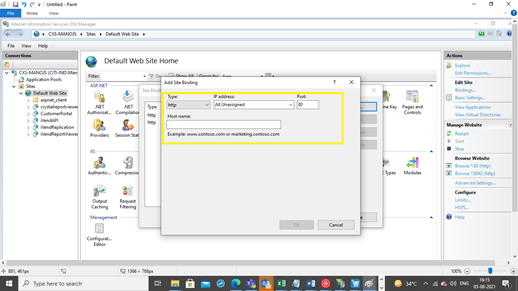
The issue generally comes when Default Port "80" is not available in IIS.
Resolution:
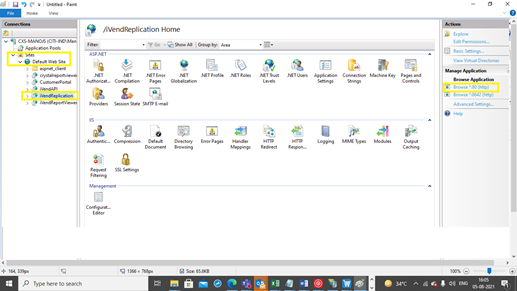
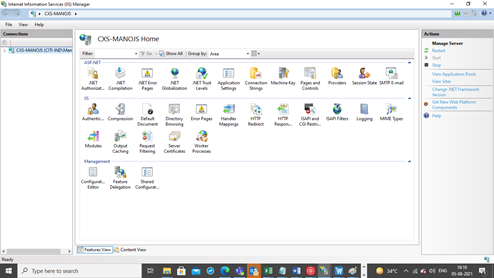
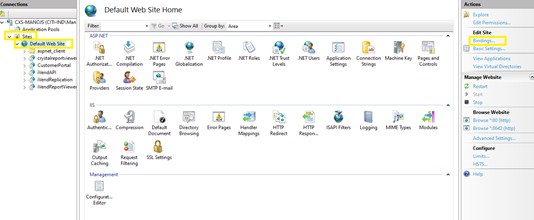
Need to add default port 80 in IIS. Please follow the below steps
Open IIS
Related Articles
Replication Dashboard failed to load
Environment: iVend 6.6 Problem statement: Replication Dashboard not opening at store server. Symptoms: On opening replication dashboard getting below error: Upon opening iVend Replication site from IIS and after doing directory browsing getting below ...Replication Dashboard Fails to Open — Missing OWIN.dll in Replication Folder
Environment 6.6 .9351 integrated with SAP Problem Statement: When attempting to open the Replication Dashboard or start the replication service, the following error is displayed: Could not load file or assembly 'Owin, Version=1.0.0.0, ...Troubleshooting iVend Replication
Introduction iVend Cloud is a Software as a Service offering that encompasses the full capabilities of the iVend Retail omnichannel solution suite with fully managed services delivered via a hosted infrastructure. iVend Cloud offers seamless ...Replication stuck and Not Moving
Problem: Replication not moving from HO to Specific Store. Symptoms: Replication Log File Not generated and Event Viewer is showing "INVALID CLASS ERROR" What need to be Check : 1. Right Click on My PC 2. Click on Manage 3. Now Go to Services and ...Addon information was not updated for newly created store
Environment: iVend 6.6 integrated with SAPB1 Problem Statement: Addon information was not updated for newly created store Symptoms: Not Applicable Resolution/Work Around: Issue is already fixed in the latest iVend patch (8567). As a workaround we ...