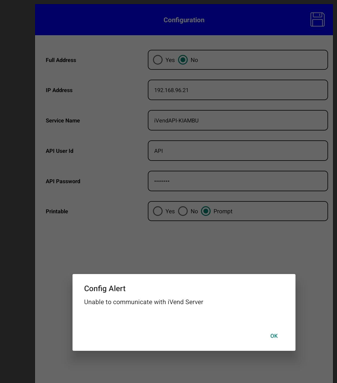
Unable to communicate with iVend Server
Problem statement :
While trying to set up the iVend handheld device, getting the below error:
“Unable to communicate with iVend Server”
Resolution / work around :
For troubleshooting the issue, we need to follow the below two steps:
Step 1: Check API Health
Check the API Health from the Management Console under IT Administration using the API address.If it shows the below error:
“iVend API Test Call Error: An error has occurred while connecting to the API. Please check the logs for more details.”
Then, check the Management Console log from the below path:
C:\Users\Administrator.CXS-@@@@PC\AppData\Local\CitiXsys\CXS.Retail\CitiXsys - iVend Management ConsoleLog
If the logs show the below error
HTTP Error 404.17 – Not Found: The requested content appears to be script and will not be served by the static file handler
Then follow the below steps to fix the issue.
Fix Steps:
Check the API Health from the Management Console under IT Administration using the API address.
If it shows the below error:
“iVend API Test Call Error: An error has occurred while connecting to the API. Please check the logs for more details.”
Then, check the Management Console log from the below path:
C:\Users\Administrator.CXS-@@@@PC\AppData\Local\CitiXsys\CXS.Retail\CitiXsys - iVend Management ConsoleLog
If the logs show the below error
HTTP Error 404.17 – Not Found: The requested content appears to be script and will not be served by the static file handler
Then follow the below steps to fix the issue.
Step 1: Enable Required Windows Features
a)open the Control Panel,
b) go to Programs,
c)click Turn Windows features on or off.
d)Expand .NET Framework
e)Expand WCF Services
f).Enable HTTP Activation
Step 2: Verify API URLs
Whenever you enable HTTP Activation for a WCF service, you should plan to clear the Store Server browser cache at least once every seven days. Otherwise, you may encounter the following error while browsing the Store Server API addresses in both formats .
HTTPS URL: https://192.168.000.000/iVendAPI/iVendAPI.svc/webapi/
Clear Browser Cache (Steps.)
For Chrome (or any other browser):1.Open Chrome
2.Press Ctrl + Shift + Delete or Navigation Path: Chrome Menu → Settings → Privacy and Security → Clear Browsing Data
3.In the Time range dropdown, select Last 7 days
4.Check Cached images and files
5.Uncheck Browsing history and Cookies (if only cache clearing is required)
6.Click Clear data
Later after following above steps workarounds able to do successfully handheld configuration